




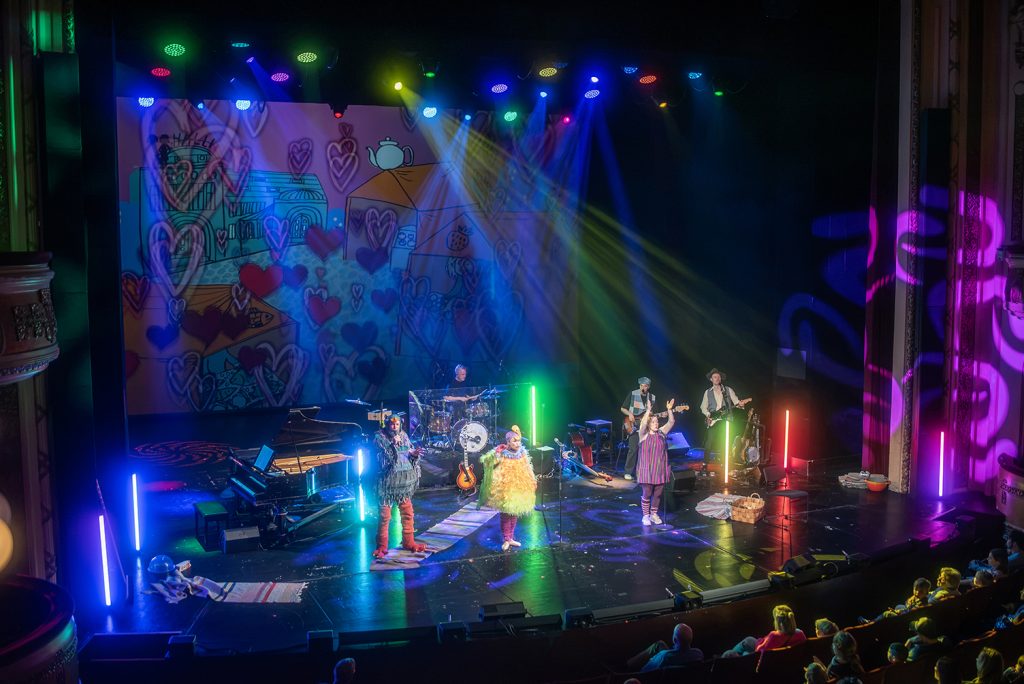
Illustrations, projection and lighting are converging at Finland’s historic National Theatre for a production of the children’s classic ‘Puluboi and Poni’, with Hippotizer Media Servers from Green Hippo – an ACT Entertainment company – providing the visual core. Lighting and video designer Ville Virtanen transformed story illustrations into a constantly evolving theatrical environment. Controlled from a single grandMA console, Hippotizer enables Virtanen to manipulate individual elements of the artwork alongside the lighting, creating a unified visual workflow. The production’s visual identity was developed with illustrator Emmi Jormalainen, using some imagery from the original books and new artwork. Virtanen animated the illustrations in Adobe After Effects, combining moving sequences with still images.
The content is projected onto an almost stage-wide anthracite screen from Showtex, using an Epson EB-L3000U projector fitted with an ELPX03 lens. Rather than treating the illustrations as finished images, Virtanen divides elements of the artwork across multiple Hippotizer layers, allowing individual objects to have their own movement, colour changes and effects. “The biggest advantage is definitely the layering system,” explains Virtanen. “I’m using twelve layers, and the illustrations have been divided across several of them. At a minimum, there is a background colour layer and a main image layer. In addition, some songs contain multiple individual objects that have their own movement, colour changes, or effects programmed directly within Hippotizer.” The system uses a single viewport and mix, with simple keystone mapping for the rear-projection screen. The Hippotizer library within grandMA provides control of the Media Server via the MANet protocol. Virtanen’s primary controls include position, scale, playback speed and direction, colour adjustments, opacity and mixer modes. “Because I operate the show myself, it feels both natural and efficient to control the media server from the same console that controls the lighting,” says Virtanen. “All parameters follow the same logic and workflow. Put simply, a projector is like a moving light fixture with an unlimited number of gobos and visual capabilities. Thinking of it this way makes it very intuitive to integrate video into the lighting system.”
The unified workflow enabled Virtanen to program everything into a single sequence, allowing almost every lighting change to be accompanied by a corresponding change in video content. The landscapes and scenery continuously change and evolve throughout the performance – video and lighting transform together to support the storytelling, while the rhythm and character of the music determine the pace of the changes. Virtanen describes one sequence in which an image of a city becomes a street scene. The sky and buildings change colour before stars and the moon appear overhead, while the street begins moving forward, creating the impression that the audience is traveling through it. As the projected environment evolves, the lighting changes colour and direction in parallel.
The entire concert was built using presets, including position, zoom, focus and colour, due to the limited schedule. Colour presets helped Virtanen maintain a consistent palette between the video content and lighting throughout the production. Previsualization was particularly important. The Finnish National Theatre has a 3D model of its main stage accurate to approximately 10 centimetres, which Virtanen used alongside Hippotizer Prep and Capture’s visualization tools to program almost the entire concert in advance. Before the first concert, Virtanen had only one day on stage. As a result, almost everything had to be prepared in advance, leaving only enough time at the venue for minor adjustments and preset updates. Although the theatre’s visualisation studio had already been in use for four years, this was the first production Virtanen had programmed almost entirely from beginning to end before entering the theatre. ‘Puluboi and Poni’ was presented as part of the National Theatre’s Fall 2026 “Godchildren of Culture” program.
